
Last reviewed: 5 November 2026
Quick answer: Windows 10 ESU (Extended Security Updates) now runs until 12 October 2027 for home users. Windows 10 reached end of support on 14 October 2025, so only enrolled PCs receive security fixes. You can still enrol at any time before 12 October 2027.
In this article
Key facts at a glance
| Item | Detail |
|---|---|
| Windows 10 end of support | 14 October 2025 |
| Previous consumer ESU end date | 13 October 2026 |
| New consumer ESU end date | 12 October 2027 |
| Extension announced | 25 June 2026 |
| Already enrolled? | Coverage continues automatically – no action needed |
| Eligible version | Windows 10, version 22H2 (Home, Pro, Pro for Workstations, Education) |
| Ways to enrol | Windows Backup sync (free), 1,000 Microsoft Rewards points, or a one-off payment (US$30 or local equivalent) |
| Devices per enrolment | Up to 10 PCs on the same Microsoft account |
| What you get | Critical and important security updates only |
| What you don’t get | New features, non-security fixes, technical support |
What has changed?
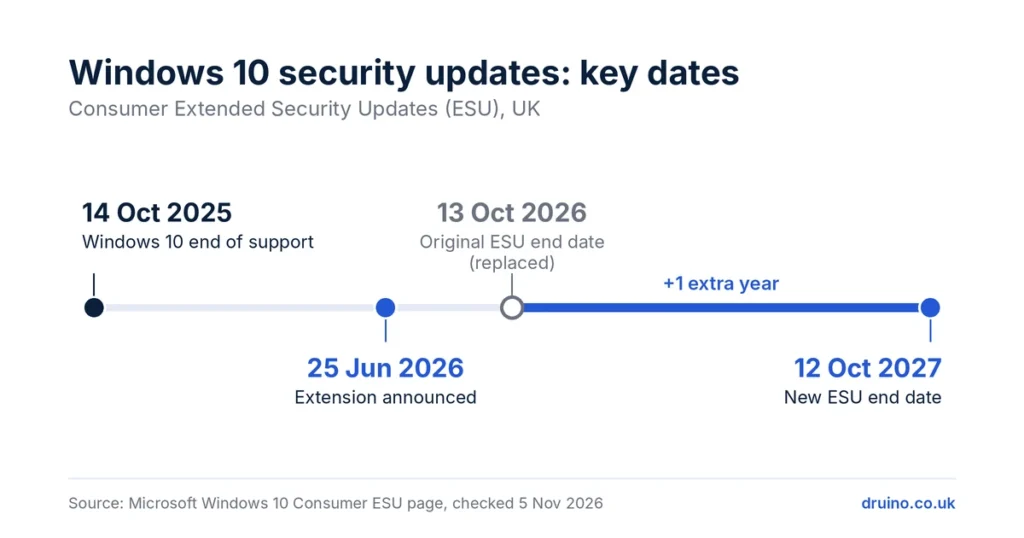
On 25 June 2026, Microsoft updated its Windows 10 ESU page. The consumer programme, first planned to end on 13 October 2026, now runs until 12 October 2027.
If your PC is already enrolled, nothing changes for you: coverage continues automatically. If you never enrolled, your PC has received no security updates since October 2025. You can still enrol now.
Many websites still quote October 2026. That date is out of date.
Is my PC eligible for Windows 10 ESU?
Your PC can enrol if it meets all of these conditions:
- It runs Windows 10, version 22H2, with the latest updates installed.
- It runs Home, Pro, Pro for Workstations or Education.
- You are signed in as an administrator.
- It is a personal device. PCs joined to a work domain, managed by an employer or in kiosk mode use Microsoft’s separate business ESU programme.
A child’s Microsoft account cannot enrol. A parent or adult account holder must do it.
How to enrol in Windows 10 ESU – step by step
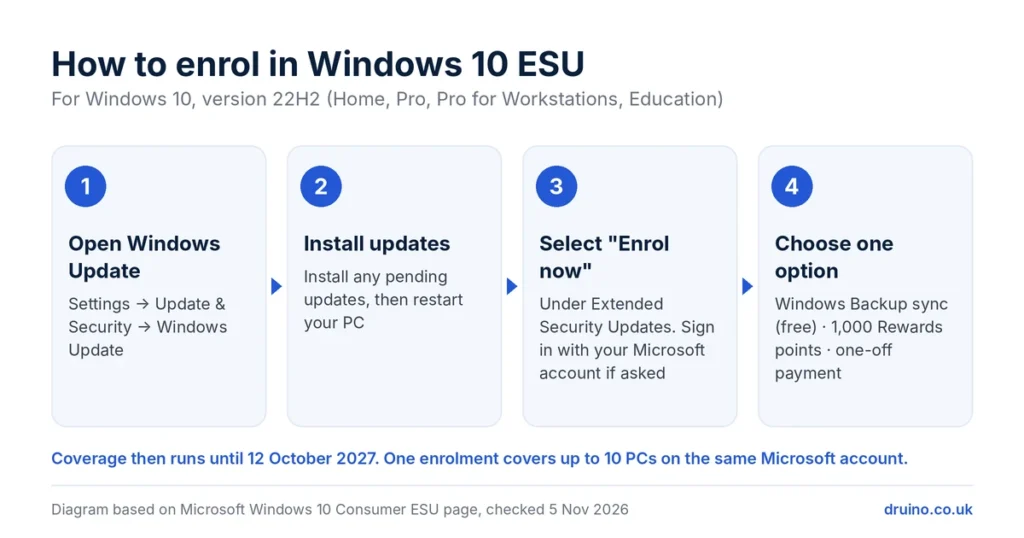
- Open Settings → Update & Security → Windows Update.
- Install any pending updates and restart.
- Select Enrol now under Extended Security Updates.
- Sign in with your Microsoft account if asked.
- Choose one option: sync your settings with Windows Backup (free), redeem 1,000 Microsoft Rewards points, or make a one-off payment. The price in pounds is shown in the wizard.
- Confirm. Your PC then receives monthly security updates until 12 October 2027.
One enrolment covers up to 10 PCs on the same Microsoft account.
How to check if your PC is already enrolled
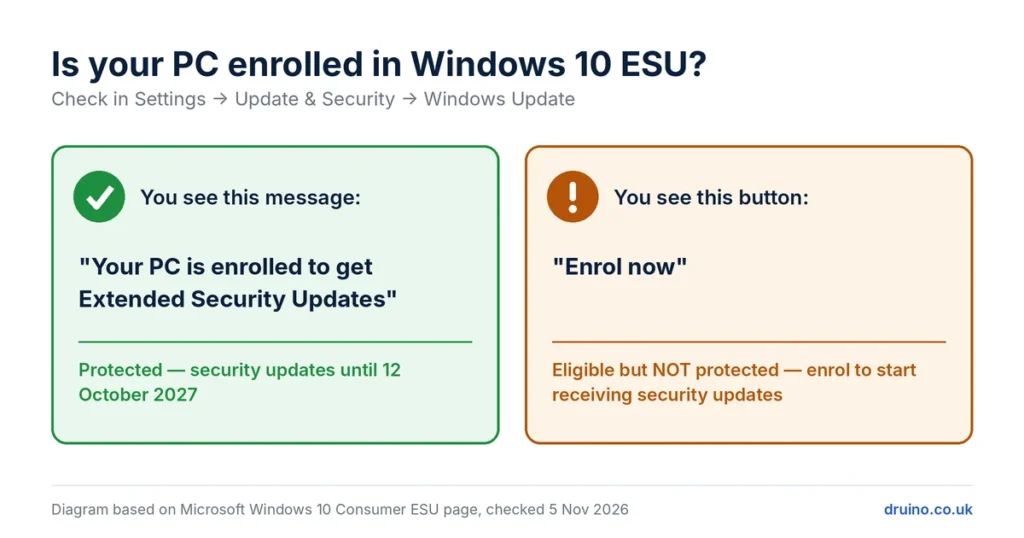
Go to Settings → Update & Security → Windows Update. An enrolled PC shows: “Your PC is enrolled to get Extended Security Updates.” If you see an Enrol now button instead, your PC is eligible but not yet protected.
Also open View update history to confirm that recent security updates installed without errors.
What happens after 12 October 2027?
Your PC will keep working. Microsoft will stop sending security fixes to consumer Windows 10 PCs, so any new vulnerability will stay open. Microsoft has not announced a further consumer extension. Plan your move to Windows 11 before that date.
Your options
| Option | Best for | Cost |
|---|---|---|
| Stay on Windows 10 with ESU | PCs that cannot run Windows 11, as a temporary bridge | Free (Windows Backup or Rewards) or one-off payment |
| Free upgrade to Windows 11 | PCs that meet Windows 11 requirements and already have a genuine Windows 10 licence | Free via Windows Update |
| Buy a Windows 11 licence | A clean install, a new or self-built PC, or moving from Home to Pro | One-time licence |
| Replace the PC | Hardware that does not meet Windows 11 requirements | Price of a new PC |
Check Windows 11 compatibility first. Windows 11 needs a supported 64-bit processor, 4 GB of RAM, 64 GB of storage, TPM 2.0 and Secure Boot. Microsoft’s free PC Health Check app tells you whether your PC qualifies. You can also use our compatibility checker.
If you need a new licence, Druino sells Windows 11 Home and Windows 11 Pro keys, delivered by email with an activation guide.
Frequently asked questions
When does Windows 10 support end in the UK?
Windows 10 reached end of support on 14 October 2025. PCs enrolled in the consumer Extended Security Updates programme receive security updates until 12 October 2027.
Do I need to re-enrol or pay again because of the extension?
No. PCs already enrolled in consumer ESU continue automatically until 12 October 2027.
Is Windows 10 ESU free in the UK?
It can be. You can enrol for free by syncing your settings with Windows Backup, or by redeeming 1,000 Microsoft Rewards points. The alternative is a one-off payment, shown in pounds in the enrolment wizard.
Will my Windows 10 PC stop working after October 2027?
No. It will keep running, but it will no longer receive security updates, which makes it more exposed to new threats.
Can I upgrade from Windows 10 to Windows 11 for free?
Yes, if your PC meets the Windows 11 hardware requirements and has a genuine Windows 10 licence. The upgrade is offered through Windows Update.
Does ESU give me new features or technical support?
No. ESU only provides critical and important security updates.
Sources
- Windows 10 Consumer Extended Security Updates (ESU) – Microsoft UK
- Microsoft gives Windows 10 users an extra year of free security updates – Help Net Security
- Windows 10 extended security updates to October 2027 – Selectra UK
- Free Windows 10 security updates run until 2027, but not every PC qualifies – TechRepublic
Druino is an independent software reseller (DRUINO LTD, company no. 17276922) and is not affiliated with Microsoft Corporation. Licences are subject to the publisher’s End User Licence Agreement (EULA)


