
Last reviewed: 6 November 2026
Quick answer: Office 2021 end of support was 13 October 2026, and Microsoft has confirmed there is no extension and no Extended Security Updates. Office 2021 apps keep working on Windows, but they no longer receive security fixes, bug fixes or technical support. The supported one-time purchase is now Office 2024, supported until 9 October 2029.
Table of Contents
Key facts at a glance
| Item | Detail |
|---|---|
| Office 2021 end of support | 13 October 2026 |
| Extension or paid security updates? | None |
| Does Office 2021 still open? | Yes, on Windows – without security updates |
| Also ended | Office 2016 and Office 2019 (14 October 2025) |
| Office LTSC 2021 (business volume edition) | Also ended 13 October 2026 |
| Current supported one-time purchase | Office 2024 – supported until 9 October 2029 |
| Subscription alternative | Microsoft 365 – updated continuously, no fixed end date |
What does “end of support” mean for Office 2021?
Since 13 October 2026, Microsoft no longer provides for Office 2021:
- security fixes for newly discovered vulnerabilities
- bug fixes and software updates
- phone and chat technical support
- updates to online help content, most of which will be retired
Microsoft has confirmed there is no extension and no Extended Security Updates programme for Office 2021. This is different from Windows 10, which has a consumer ESU programme until 12 October 2027 (see our Windows 10 ESU guide).
Does Office 2021 still work?
On Windows: yes. Word, Excel, PowerPoint and Outlook 2021 keep opening and editing files. Nothing is switched off on 13 October 2026. The risk grows over time, because new security flaws will not be fixed.
On Mac: it depends on your version. A licensing certificate used by Office for Mac expired on 13 July 2026.
- Office 2021 for Mac updated to version 16.83 or later (macOS 12 Monterey or later) keeps working normally.
- Older Office 2021 for Mac builds, and all Office 2019 for Mac installations, switch to view-only mode: you can open and print files, but not edit or save them.
Office on Windows is not affected by this certificate issue.
Which Office versions are still supported?
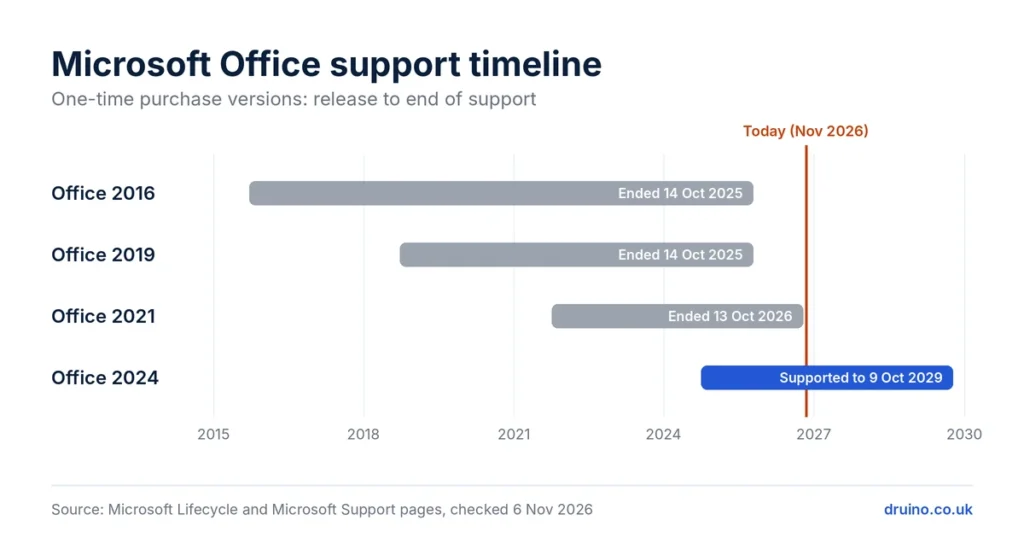
| Version | Support status | End of support |
|---|---|---|
| Office 2016 | Ended | 14 October 2025 |
| Office 2019 | Ended | 14 October 2025 |
| Office 2021 | Ended | 13 October 2026 |
| Office 2024 | Supported | 9 October 2029 |
| Microsoft 365 (subscription) | Supported | No fixed date – updated continuously |
How to check which version of Office you have
On Windows:
- Open Word (or any Office app).
- Select File → Account.
- Under Product Information, read the product name, for example “Office Professional Plus 2021”.
- Select About Word to see the exact version and build.
On Mac: open Word, then select Word → About Word in the menu bar. The window shows the version number, for example 16.83.
Is it safe to keep using Office 2021?
For a short transition, the risk is limited if your Windows is up to date and you are careful with email attachments. Over time, it increases:
- Malicious documents: Word and Excel files are a common way to spread malware. Unpatched Office apps are an easier target.
- Compatibility: newer file features and Microsoft 365 services may stop working correctly with an unsupported version.
- UK businesses: the Cyber Essentials scheme requires software to be licensed and supported by the vendor. An unsupported Office version can cause you to fail certification.
Your options after Office 2021
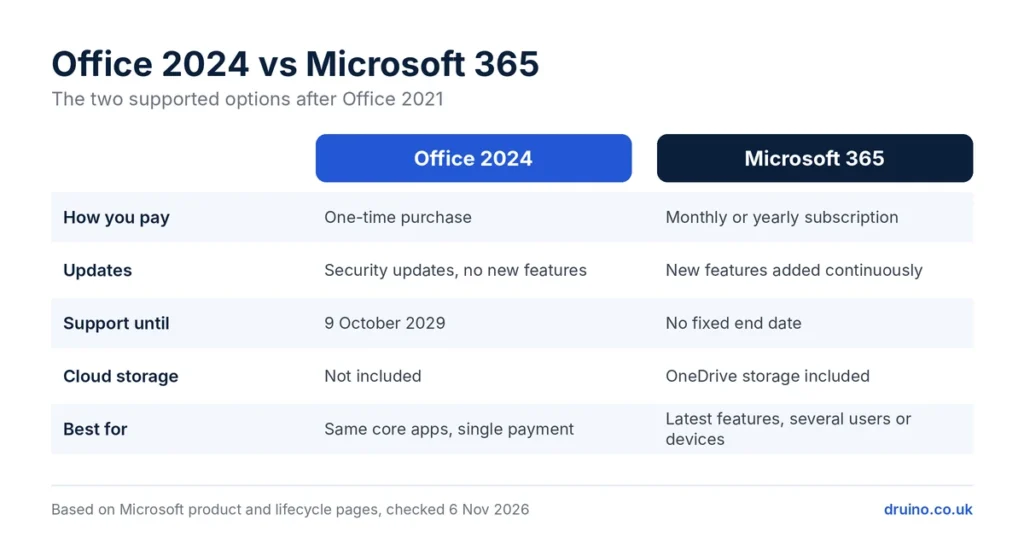
| Option | Best for | How you pay | Support |
|---|---|---|---|
| Office 2024 | Users who want to pay once and keep the same apps | One-time purchase | Until 9 October 2029 |
| Microsoft 365 | Users who want the latest features, cloud storage, or several devices and users | Monthly or yearly subscription | Updated continuously |
| Keep Office 2021 for now | A short transition period on Windows | Nothing more | No security updates |
| Free alternatives | Light use: Microsoft 365 web apps (free with a Microsoft account) or LibreOffice | Free | Depends on the product |
Office 2024 or Microsoft 365? Choose Office 2024 if you use the same core apps every day and prefer a single payment. Choose Microsoft 365 if you want new features as they arrive, OneDrive cloud storage, or one subscription for several people and devices.
If you choose Office 2024, Druino sells Office 2024 Professional Plus and Office 2024 Standard keys for Windows, delivered by email with an installation and activation guide. Each product page states its licence type and system requirements.
Frequently asked questions
When did Office 2021 support end?
Microsoft ended support for Office 2021 on 13 October 2026. There is no extension and no Extended Security Updates programme.
Will Office 2021 stop working?
No. On Windows, Office 2021 keeps working, but it no longer receives security fixes, bug fixes or technical support. On Mac, it keeps editing only if it was updated to version 16.83 or later.
Is Office 2019 still supported?
No. Office 2019 and Office 2016 reached end of support on 14 October 2025.
How long is Office 2024 supported?
Microsoft supports Office 2024 until 9 October 2029.
Should I upgrade to Office 2024 or Microsoft 365?
Choose Office 2024 for a one-time purchase with support until 9 October 2029. Choose Microsoft 365 if you want continuous updates, cloud storage or several users on one subscription.
Can I still buy Office 2021?
Some sellers still offer it, but it no longer receives security updates. For a new purchase, a supported version such as Office 2024 or Microsoft 365 is the safer choice.
Druino is an independent software reseller (DRUINO LTD, company no. 17276922) and is not affiliated with Microsoft Corporation. Licences are subject to the publisher’s End User Licence Agreement (EULA)
Sources
- End of support for Office 2021 – Microsoft Support
- Products ending support in 2029 – Microsoft Lifecycle
- From July 2026: MS Office on older Macs can only read and print – heise online
- Office 2019 end of life: ended 14 October 2025 – endoflife.ai
- Cyber Essentials requirements: software must be licensed and supported – IASME


[…] This is the most important difference. Microsoft Office 2021 reached its end of support on 13 October 2026. It still opens and works, but Microsoft no longer releases security patches or bug fixes for it, so any new vulnerability stays unfixed. Office 2024 will receive security updates until October 2029. Read more in our guide: Office 2021 end of support: does it still work? […]