Managing modern enterprise infrastructure requires balancing processing power, virtualization flexibility, cybersecurity resilience, and software compliance. With the official release of Microsoft’s latest server operating system, securing a genuine windows server 2025 license is a primary objective for system administrators, IT consultants, and business infrastructure teams worldwide.
Windows Server 2025 brings fundamental breakthroughs to server management, including zero-reboot hotpatching, next-generation Active Directory architecture, hyper-converged storage performance enhancements, and native hybrid-cloud integration via Azure Arc. However, understanding the intricacies of Microsoft’s Per-Core licensing model, virtual machine (VM) allocation rules, Client Access Licenses (CALs), and edition distinctions can be challenging.
In this comprehensive 2026 guide, we break down everything you need to know about purchasing and deploying a windows server 2025 license. We cover core server features, hardware system requirements, the mathematical rules of Core licensing, Standard vs. Datacenter feature comparisons, CAL architecture, clean installation procedures, and step-by-step activation methods using Druino.
1. What Is New in Windows Server 2025? (Technical Architecture)
Windows Server 2025 is not merely an incremental update; it represents a major structural architectural upgrade tailored for high-density virtualization, artificial intelligence workloads, and secure hybrid environments.
1.1 Hotpatching for All Server Editions
When managing a windows server 2025 license, Hotpatching is now integrated natively into the core operating system. Hotpatching modifies in-memory code for OS updates without requiring physical or virtual server reboots. This eliminates monthly patching maintenance windows, drastically reduces infrastructure downtime, and ensures continuous service availability for mission-critical applications.
1.2 Next-Generation Active Directory Domain Services (AD DS)
Upgrading your Active Directory infrastructure with a windows server 2025 license brings its most significant architectural boost in over a decade. Key performance and security enhancements include:
- 32k Database Page Size: Upgraded from legacy 8k pages, allowing Active Directory to store larger multi-valued attributes and perform significantly faster LDAP queries.
- Modernized Kerberos Authentication: Implements AES encryption by default and eliminates deprecated encryption protocols (RC4, DES).
- NUMA Optimization: Scaled to leverage modern multi-socket server hardware with hundreds of physical CPU cores.
1.3 NVMe SAN Storage Speed & Storage Spaces Direct (S2D)
Storage performance in windows server 2025 license sees massive structural gains. Through native NVMe over Fabrics (NVMe-oF) integration and optimized storage stack caching, servers experience up to 90% higher I/O operations per second (IOPS) compared to Windows Server 2022. Software-defined storage pools handle heavy database workloads and virtualization clusters with dramatically reduced latency.
1.4 Hyper-V & GPU Partitioning (GPU-P)
For organizations deploying artificial intelligence (AI), machine learning (ML), or virtual desktop infrastructure (VDI), Hyper-V in Windows Server 2025 supports dynamic GPU Partitioning (GPU-P). This allows system administrators to divide physical graphics processor resources across multiple virtual machines securely, enabling high-performance rendering and compute processing without allocating dedicated physical GPUs to single guests.
1.5 Advanced Network Security & SMB over QUIC
Deploying a windows server 2025 license ensures that data in transit is protected by default across local networks and remote edge locations:
- SMB over QUIC: Replaces traditional TCP Port 445 file sharing with encrypted UDP Port 443 transport, allowing remote workers to access corporate file shares securely without requiring a traditional VPN connection.
- TLS 1.3 Enabled by Default: Ensures state-of-the-art cryptographic handshakes across all web, application, and domain communications.
2. Hardware System Requirements & Compatibility Matrix
Before purchasing your windows server 2025 license, verify that your target physical hardware satisfies Microsoft’s updated baseline system specifications:
| Hardware Component | Minimum System Requirement | Recommended Production Specification |
| Processor Architecture | 1.4 GHz 64-bit (x64) processor | 2.0 GHz+ Multi-core (AMD EPYC / Intel Xeon) |
| Physical CPU Cores | 4 Cores minimum | 16 to 64 Cores (Matching core licensing rules) |
| System RAM | 512 MB (Server Core) / 2 GB (Desktop) | 32 GB to 512 GB+ ECC Registered RAM |
| Storage Adapter | PCI Express compliant storage controller | NVMe / SAS 12Gbps Hardware RAID |
| Disk Storage Space | 32 GB baseline drive partition | Enterprise SSD / NVMe RAID Arrays (ReFS) |
| Network Interface | 1 Gbps Ethernet adapter | 10/25/100 Gbps RDMA-capable NICs |
| System Security | Trusted Platform Module (TPM 2.0) | TPM 2.0 + UEFI with Secure Boot Enabled |
3. Edition Comparison: Windows Server 2025 Standard vs. Datacenter vs. Essentials
Selecting the proper windows server 2025 license requires evaluating your organization’s virtualization density and software-defined networking requirements.
3.1 Windows Server 2025 Standard Edition
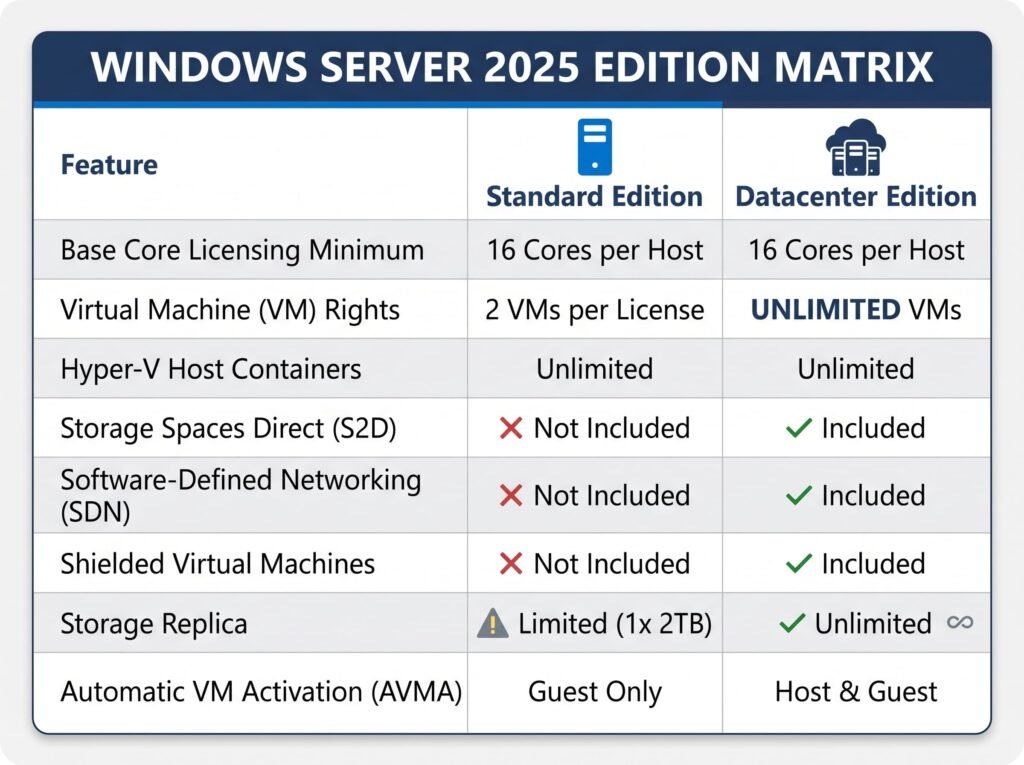
Windows Server 2025 license Standard is designed for physical physical server environments, edge deployments, or lightly virtualized computing environments.
- Virtualization Capacity: Includes licensing rights for two Virtual Machines (VMs) or one Hyper-V Isolated Container, provided all physical cores on the server host are fully licensed.
- License Stacking: Additional VM density can be achieved on Standard edition by “stacking” multiple Standard core licenses on the same physical host (e.g., buying two 16-Core Standard licenses grants rights for 4 VMs).
- Target Audience: Small-to-medium businesses (SMBs), localized branch offices, and specialized single-purpose physical servers.
3.2 Windows Server 2025 Datacenter Edition
Investing in a Datacenter windows server 2025 license is engineered for highly virtualized enterprise cloud infrastructures, data centers, and hyper-converged clusters.
- Unlimited Virtualization: Includes rights to run an unlimited number of Virtual Machines (VMs) and Hyper-V Containers on the licensed physical host.
- Exclusive Datacenter Features:
- Storage Spaces Direct (S2D): Build highly available, scalable software-defined storage using internal local drive arrays.
- Software-Defined Networking (SDN): Manage virtual network topologies, micro-segmentation, and software load balancers centrally.
- Automatic Virtual Machine Activation (AVMA): Activate Windows Server guest VMs running on the Hyper-V host automatically without managing individual product keys for each guest VM.
- Target Audience: Enterprise data centers, private cloud hosters, high-density virtual environments, and mission-critical database clusters.
3.3 Windows Server 2025 Essentials Edition
A specialized Essentials windows server 2025 license is tailored specifically for very small businesses with basic IT infrastructure requirements:
- Restricted to a single CPU socket with a maximum of 10 physical cores.
- Supports up to 25 individual users or 50 unique devices without requiring separate Client Access Licenses (CALs).
- Cannot be joined to an existing corporate Active Directory domain as a secondary domain controller.
4. The Core Licensing Model Explained (Step-by-Step Calculation)
To ensure legally compliant infrastructure deployments during Microsoft Software Asset Management (SAM) audits, system administrators must understand Microsoft’s Per-Core licensing mechanics when purchasing a windows server 2025 license.
4.1 Base Licensing Minimums
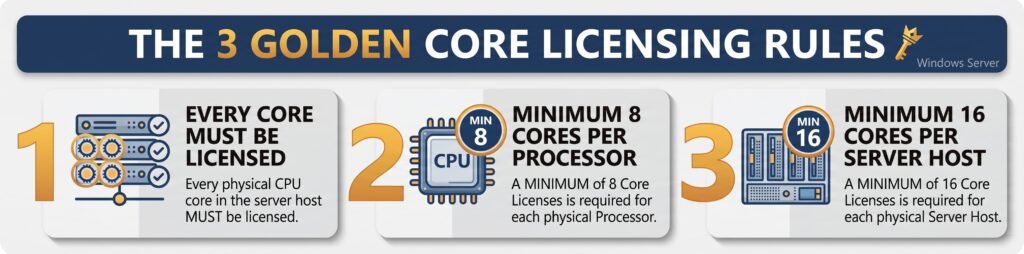
- Single-Processor Servers: When purchasing a windows server 2025 license, Even if your physical server contains a single 4-core, 8-core, or 12-core CPU, Microsoft rules dictate that you must purchase a minimum 16-Core license pack.
- Dual-Processor Servers: If your server contains two physical processors with 8 cores each (16 cores total), you require a 16-Core license pack.
4.2 Calculation Scenarios for Multi-Socket & High-Core Count Hardware
When configuring a windows server 2025 license for multi-processor hosts, follow these real-world core calculation rules:
Scenario A: Single CPU Server with 12 Cores
- Physical Hardware: 1 Socket x 12 Physical Cores = 12 Cores.
- Licensing Rule Application: Rule 3 enforces a server-wide baseline minimum of 16 Cores.
- Required License: 16-Core Base License Pack.
Scenario B: Dual CPU Server with 16 Cores Each (32 Cores Total)
- Physical Hardware: 2 Sockets x 16 Physical Cores = 32 Cores.
- Licensing Rule Application: All 32 physical cores must be covered.
- Required License: 16-Core Base Pack + (8 x 2-Core Add-On Packs) OR 2 x 16-Core License Packs (Covering 32 Cores total).
Scenario C: High-Density Dual CPU Server with 32 Cores Each (64 Cores Total)
- Physical Hardware: 2 Sockets x 32 Physical Cores = 64 Cores.
- Licensing Rule Application: All 64 physical cores must be covered.
- Required License: 4 x 16-Core License Packs (Covering 64 Cores total).
4.3 Standard Edition Virtual Machine Stacking Formula
If you select Windows Server 2025 Standard Edition but need to host more than 2 Virtual Machines, you must re-license all physical cores on the server for each additional pair of VMs:
$$\text{Total Cores Required} = \left( \text{Physical Server Cores} \right) \times \left( \frac{\text{Desired Number of VMs}}{2} \right)$$
- Example: A 16-core physical server hosting 6 Virtual Machines requires $16 \times (6 / 2) = 48$ Core Licenses of Windows Server 2025 Standard.
(Note: If the cost of stacking Standard core licenses exceeds the cost of a Datacenter edition license, upgrading to Datacenter is recommended for unlimited VM rights).
5. Client Access Licenses (CALs) Demystified
A common point of confusion when structuring a windows server 2025 license architecture is the difference between core server licenses and Client Access Licenses (CALs).
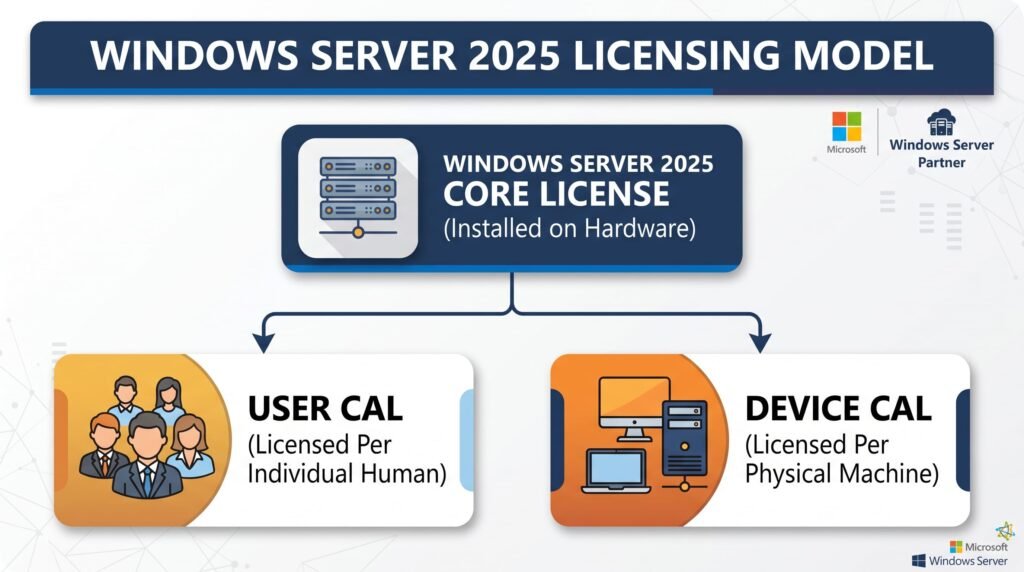
A server core license authorizes the operating system to run on the physical hardware. A CAL is a legal access license that grants individual users or network devices permission to connect to domain controller services, file shares, print queues, DHCP/DNS servers, or database instances hosted on Windows Server 2025.
5.1 User CALs vs. Device CALs: Which Should You Choose?
Option A: Windows Server 2025 User CALs
A User CAL licenses a single named employee or user to access server services from any number of endpoint devices (workplace desktop, home laptop, mobile phone, tablet).
- Best For: Companies with employees who travel, work remotely, or operate multiple computing devices throughout the workday.
- Cost Efficiency: Highly economical when the number of employees is lower than the total number of connected devices.
Option B: Windows Server 2025 Device CALs
A Device CAL licenses a single physical computer or endpoint device to access server services, regardless of how many individual human operators use that device.
- Best For: Businesses operating multi-shift work environments, call centers, manufacturing plants, warehouse logistics terminals, or shared receptionist desks.
- Cost Efficiency: Highly economical when multiple shift workers share a limited pool of physical workstations.
5.2 Remote Desktop Services (RDS) CALs
If your users require graphical remote access to applications, published desktops, or terminal server environments hosted on a windows server 2025 license, you must purchase Remote Desktop Services (RDS) CALs in addition to standard Server CALs.
- RDS User CALs: Assigned to users accessing Remote Desktop Session Hosts.
- RDS Device CALs: Assigned to physical terminals accessing remote desktop sessions.
6. How to Download and Install Windows Server 2025
Before applying your official windows server 2025 license, follow these setup steps to obtain clean media and execute a clean installation.
Step 1: Download Official ISO Media
Always source server setup files directly from official Microsoft channels to protect your infrastructure against compromised ISO images, embedded malware, or altered kernel files:
- Navigate to the official Microsoft Evaluation Center.
- Select Windows Server 2025 ISO Download (64-bit edition).
- Save the official ISO image file to your administrative workstation.
Step 2: Create Bootable Installation Media
- Insert a blank 8 GB or 16 GB USB flash drive into your workstation.
- Open utility tools such as Rufus or Microsoft USB creation software.
- Select the target Windows Server 2025 ISO file.
- Choose GPT Partition Scheme and UEFI Target System.
- Click Start to format and create your bootable media.
Step 3: Choose Your Installation Option (Server Core vs. Desktop Experience)
During the graphical setup wizard, you will be prompted to select your installation environment
| Option | Technical Description & Best Use Case |
|---|---|
| Windows Server 2025 Standard (Server Core) | Version sans interface graphique (No GUI). Gestion via Invite de commandes, PowerShell ou Windows Admin Center. Surface d’attaque et empreinte RAM réduites. |
| Windows Server 2025 Standard (Desktop Experience) | Expérience de bureau avec interface graphique complète (GUI). Idéal pour l’administration locale, les hôtes RDS et les applications anciennes (legacy). |
| Windows Server 2025 Datacenter (Server Core) | Mode Server Core optimisé pour les clusters d’hyperviseurs d’entreprise et le stockage défini par logiciel. |
| Windows Server 2025 Datacenter (Desktop Experience) | Interface graphique complète pour les hôtes virtuels à haute densité nécessitant des outils de gestion locale. |
7. How to Activate Your Windows Server 2025 License
Once installation is finalized, applying your genuine 25-character windows server 2025 license key converts your installation to a permanent, fully supported deployment.
Method 1: Graphical Activation via Windows Settings (Desktop Experience)
- Log into your Windows Server 2025 environment using local or domain Administrator credentials.
- Press
Win + Ito open Settings. - Navigate to System > Activation.
- Click Change product key.
- Enter your 25-character Windows Server 2025 License Key purchased from Druino.
- Click Activate. System status will display: “Windows is activated with a genuine digital license.”
Method 2: Command-Line Activation via Command Prompt / PowerShell (Server Core)
If you deployed Server Core without a graphical user interface, activate your system using the Windows Software Licensing Management Tool (slmgr.vbs):
- Open Command Prompt as Administrator or launch PowerShell.
- Install your 25-character product key:DOS
slmgr /ipk XXXXX-XXXXX-XXXXX-XXXXX-XXXXX(ReplaceXXXXXwith your genuine product key). - Trigger online activation with Microsoft servers:DOS
slmgr /ato - Verify detailed licensing state and expiration status:DOS
slmgr /dli
Method 3: Converting Evaluation Edition to Full Retail Server Edition
If you initially installed the Windows Server 2025 Evaluation ISO from Microsoft’s Eval Center, standard product keys cannot be entered directly into the GUI settings window. You must perform an in-place edition conversion using Deployment Image Servicing and Management (DISM):
- Open Command Prompt as Administrator.
- Verify target retail editions available for upgrade:DOS
dism /online /get-targeteditions - Convert Evaluation to full Retail edition and apply your genuine key in a single command:DOS
dism /online /set-edition:ServerStandard /productkey:XXXXX-XXXXX-XXXXX-XXXXX-XXXXX /norestart(For Datacenter edition, replaceServerStandardwithServerDatacenter). - Reboot your physical server host to complete activation:DOS
shutdown /r /t 10
8. Compliance & SAM Audits: Avoiding Risky Activator Scripts & Gray Market Keys
Operating a corporate infrastructure requires strict compliance with international software distribution laws and Microsoft Licensing Agreements.
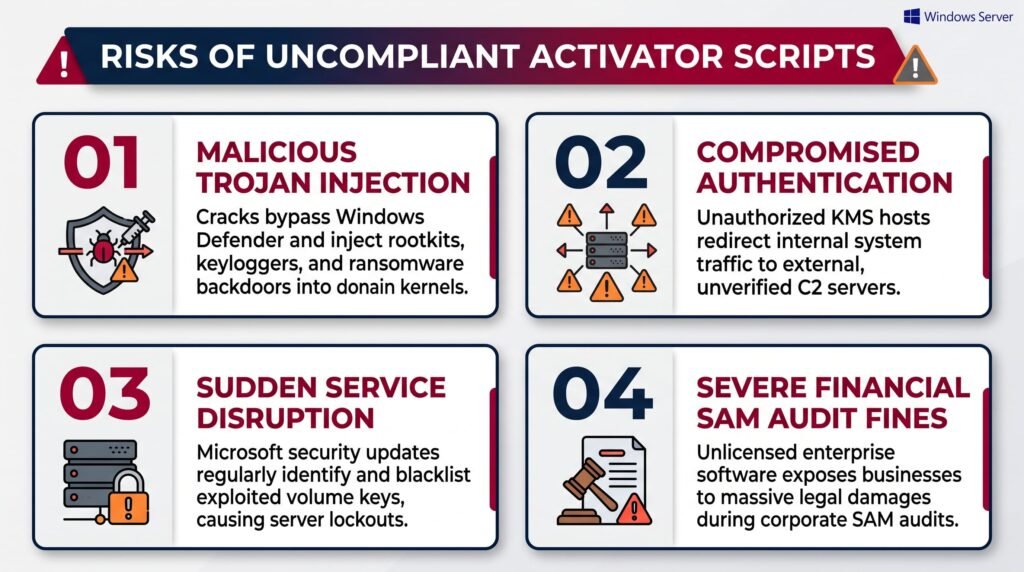
8.1 The Hidden Security Risks of KMS Activator Scripts & Cracks
In an effort to bypass software procurement costs for a windows server 2025 license, some unauthorized operators utilize third-party KMS scripts, illegal .bat files, or cracked key generators found on public repositories.
8.2 Understanding Retail vs. OEM vs. Volume Licensing
When purchasing your windows server 2025 license from authorized distributors like Druino, it is helpful to understand channel distribution models:
- Retail windows server 2025 license options: Delivered digitally as independent 25-character keys. Retail keys provide perpetual lifetime ownership, full Microsoft activation rights, and can be transferred to replacement physical server hardware if the original physical host is decommissioned.
- OEM Licenses: Pre-installed by original equipment manufacturers (Dell, HPE, Lenovo). OEM licenses are permanently locked to the initial motherboard BIOS and cannot be migrated to replacement server hosts.
- Volume Licenses (MAK/KMS): Designed for enterprise organizations deploying hundreds of server nodes under a single corporate agreement.
9. Troubleshooting Common Windows Server 2025 Activation Errors
If you experience unexpected error codes while validating your windows server 2025 license, use these official troubleshooting solutions:
Error Code 0xC004C003 (“The activation server determined the specified key is blocked”)
- Cause: Occurs when attempting to enter a key on an incorrect edition, or if network firewalls prevent outbound connection to Microsoft activation endpoints.
- Fix: Ensure outbound HTTPS traffic over TCP Port 443 is permitted to
activation.sls.microsoft.com. Verify that your installed edition matches your license key (Standard vs. Datacenter).
Error Code 0x8007232B (“DNS name does not exist”)
- Cause: The system is searching for a local Volume Activation KMS host on your local DNS network rather than contacting Microsoft online servers directly.
- Fix: Convert the activation channel from KMS to MAK/Retail by executing:DOS
slmgr /ipk XXXXX-XXXXX-XXXXX-XXXXX-XXXXX slmgr /ato
Error Code 0xC004F080 (“The Software Licensing Service reported that the product key invalid”)
- Cause: Usually caused by attempting to enter a standard retail product key directly into a Windows Server 2025 Evaluation ISO environment.
- Fix: Use the
DISM /online /set-editioncommand detailed in Section 7.3 to convert the operating system prior to activation.
10. Frequently Asked Questions (FAQ)
What is the primary difference between a core windows server 2025 license and a CAL?
A core license authorizes the operating system software to run on physical server CPU hardware. A Client Access License (CAL) grants legal permission for individual human users or endpoint devices on your network to connect to server services (Active Directory, file shares, DNS, DHCP).
How many physical core licenses do I need for a server with two 16-core CPUs?
A server with two 16-core physical CPUs has 32 physical cores total. Under Microsoft core licensing rules, all physical cores must be covered. Therefore, you require 32 Core Licenses (e.g., two 16-core license packs).
Can I perform an in-place upgrade when applying a new windows server 2025 license?
Yes. You can execute an in-place upgrade from Windows Server 2022 to Windows Server 2025 by mounting the official Windows Server 2025 ISO media, running setup.exe, and selecting “Keep personal files and apps”. However, backing up system state prior to upgrading production domain controllers is strongly recommended.
Is a Windows Server 2025 license a perpetual lifetime key?
Yes. Licenses purchased from Druino are 100% genuine perpetual lifetime licenses. You pay once and maintain permanent usage rights with no monthly subscription costs or mandatory annual renewals.
Does Windows Server 2025 Standard include Storage Spaces Direct (S2D)?
No. Storage Spaces Direct (S2D) and Software-Defined Networking (SDN) are exclusive enterprise features included only in Windows Server 2025 Datacenter Edition. Standard edition supports traditional Storage Spaces and localized Storage Replica (limited to 1 volume up to 2TB).
What happens if I do not activate Windows Server 2025?
If left unactivated, Windows Server 2025 enters a grace period notice mode. Desktop watermarks will appear, personalization settings will be locked, automated shutdown timers may trigger every 1 hour after the trial window expires, and critical security updates will be restricted.
Do I need User CALs or Device CALs for remote desktop terminal workers?
If remote employees access published remote applications or desktop environments from varying laptops, home PCs, and mobile devices, purchase RDS User CALs. If shift workers share static office or factory floor workstations, purchase RDS Device CALs.
Purchase Your Genuine Windows Server 2025 License at Druino
Ready to modernize your IT infrastructure, deploy high-speed hyper-converged storage, and secure your domain network with next-generation operating system tools?
Avoid gray-market key brokers, questionable auction listings, and uncompliant activator scripts. Secure 100% genuine, fully audit-compliant software licenses directly from Druino.
Why IT Professionals Choose Druino:
- 100% Guaranteed Official Licenses: Validated directly through official Microsoft setup portals and activation servers.
- Instant Digital Delivery: Receive your 25-character product key, official download links, and detailed tax invoices immediately after checkout.
- One-Time Perpetual Ownership: Pay once with zero recurring subscription fees.
- Dedicated Local UK Technical Support: Local assistance available via email (
support@druino.co.uk) and phone (+44 20 8040 4209).
Order your Windows Server 2025 License at Druino today and upgrade your enterprise server ecosystem with absolute confidence.