Table of Contents
In an increasingly data-driven technical world, conveying complex architectural concepts, organizational hierarchies, process flows, and enterprise IT infrastructures requires specialized diagramming tools. For IT administrators, network engineers, business analysts, and industrial architects, Microsoft Visio has remained the industry benchmark for vector graphics and diagramming for over three decades. However, navigating Microsoft’s modern procurement channels to secure the right visio license can be complicated and confusing.
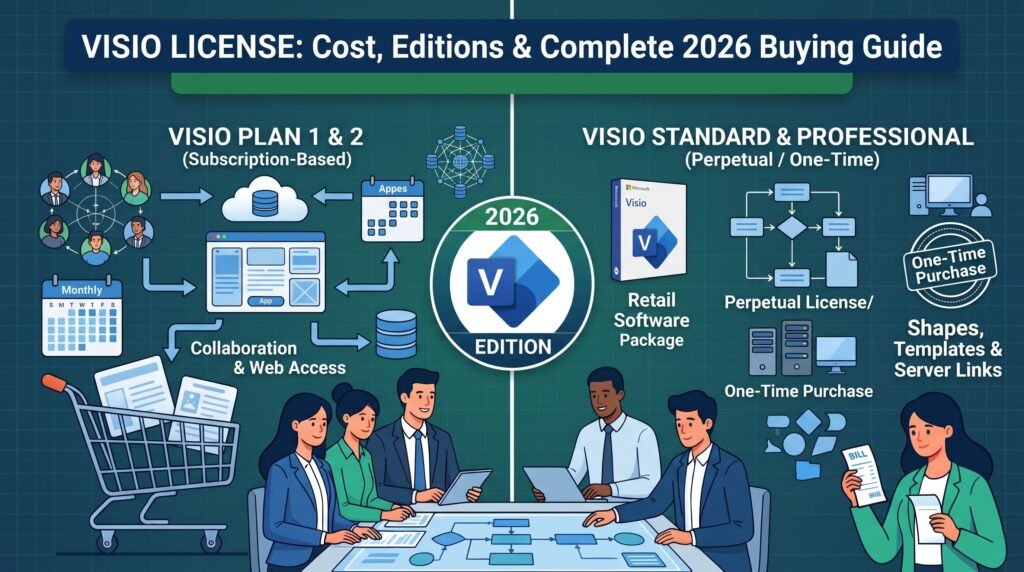
With Microsoft heavily marketing its cloud-based Microsoft 365 software subscriptions (such as Visio Plan 1 and Visio Plan 2), many corporate buyers and independent professionals believe they are locked into recurring monthly software fees. In reality, Microsoft continues to offer standalone, perpetual desktop versions for both Visio 2024 and Visio 2021. Procuring a perpetual visio license enables organizations to own the software outright through a single upfront purchase, completely eliminating ongoing SaaS overhead.
This comprehensive 2026 technical guide breaks down everything you need to know before securing a visio license. We examine the operational differences between Visio Standard and Visio Professional, evaluate the long-term economics of one-time keys versus subscriptions, explore core enterprise features, specify system requirements, and outline the step-by-step installation process to safely activate your software via Druino.
1. The Strategic Role of Dedicated Diagramming Software
To understand why thousands of enterprises specifically budget for a standalone visio license, one must look beyond standard office suites. While programs like PowerPoint or Word offer basic shape-drawing functions, they lack the computational geometric precision, semantic layer handling, and automated schema engines required for technical engineering work.
A professional diagram is not merely an illustration; it is a visual data model. When an IT engineer diagrams a network topology, every router, switch, and firewall shape contains embedded technical metadata. When a manufacturing plant designs a business process, the flowchart must strictly adhere to international notation standards such as Business Process Model and Notation (BPMN 2.0).
Microsoft Visio provides the mathematical snapping grid, dynamic connector routing, and shape intelligence necessary to build industrial-grade schematics. For businesses seeking to optimize operational expenditure, obtaining a permanent visio license represents a return to sensible digital asset management. You equip your engineers with the ultimate diagramming suite without subjecting the company to recurring annual subscription liabilities.

2. What Is a Perpetual Visio License?
When sourcing software for an engineering or IT department, procurement leads must distinguish between temporary cloud access and permanent ownership. A perpetual visio license provides perpetual rights to use a specific desktop version (such as Visio Standard 2024 or Visio Professional 2024) without expiration dates or mandatory subscription renewals.
Key Characteristics of Perpetual Ownership:
- One-Time Capital Expenditure: You make a single payment at checkout. There are zero auto-billing charges, zero recurring user fees, and zero surprise license audits.
- Transparent Pricing: The total microsoft visio cost is clearly defined upfront, shielding your IT budget from annual SaaS price increases.
- Full Local Processing Speed: A standalone visio license executes natively on your local processor and graphics chip. It effortlessly handles complex vector schematics containing thousands of connected shapes without the rendering lag often found in web-based alternatives.
- Total Offline Capability: Professionals working in secure data centers, military-grade environments, or remote construction sites cannot rely on continuous cloud connectivity. A lifetime visio license runs completely offline without requiring periodic server verification checks.
- Long-Term Enterprise Support: Standalone retail licenses are covered under the official Microsoft Lifecycle Policy, providing regular security updates, vulnerability patches, and performance fixes directly through standard Windows Update channels.
3. Microsoft Visio Standard vs. Visio Professional
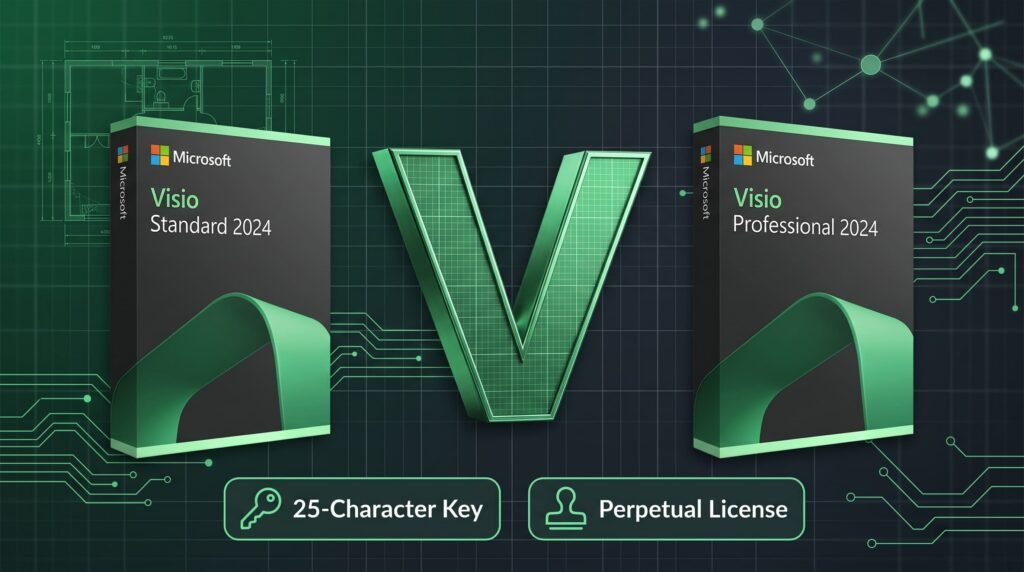
Choosing the appropriate tier of your visio license depends entirely on the technical depth and compliance requirements of your workflow. Visio is available in two desktop editions: Standard and Professional.
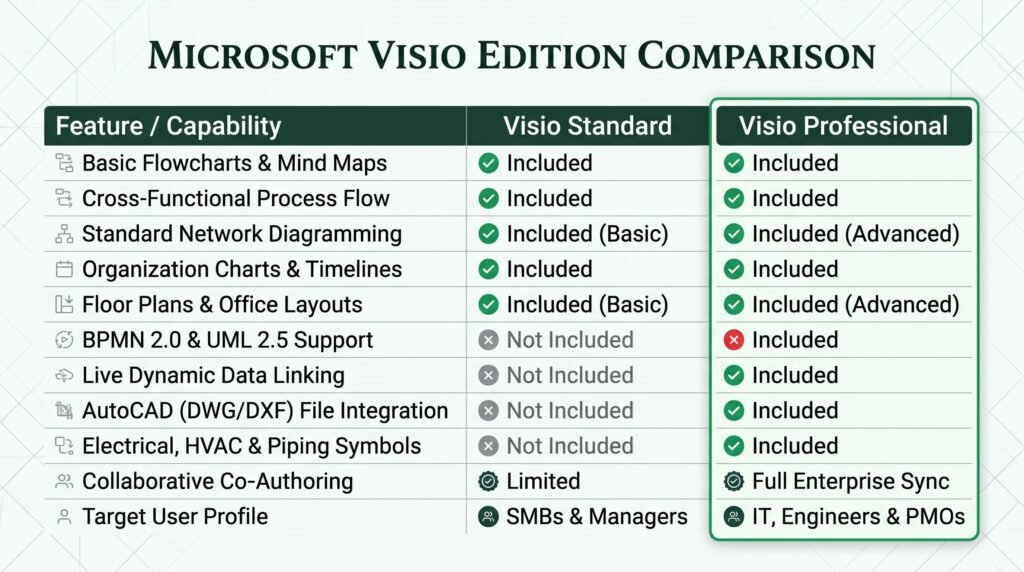
Microsoft Visio Standard 2024
The Standard edition is engineered for business managers, educators, administrators, and consultants who require clear, communicative visual aids:
- Versatile Business Stencils: Includes pre-built templates for basic flowcharts, cross-functional flowcharts (swimlane diagrams), organizational hierarchies, and general timelines.
- Smart Connector Framework: Connectors automatically navigate around intermediate shapes, preserving clean aesthetic alignments without manual redraws.
- Intuitive Formatting: Apply coordinated color themes, container groupings, and dynamic visual styles with a single click.
- The Limitation: A Standard visio license lacks high-level technical engineering stencils (such as industrial piping, detailed electrical circuitry, or database reverse-engineering) and does not support automated live external data synchronization.
Microsoft Visio Professional 2024
The Professional edition is the gold standard for software engineers, enterprise architects, network administrators, and industrial designers:
- All Standard Tools Included: Fully encompasses every stencil, shape template, and basic formatting tool present in the Standard release.
- Strict Industry Compliance: Natively supports Business Process Model and Notation (BPMN 2.0), Unified Modeling Language (UML 2.5), and Institute of Electrical and Electronics Engineers (IEEE) schematic standards.
- Live Dynamic Data Linking: The cornerstone feature of an advanced visio license. You can connect individual diagram shapes directly to live external data sources (including Microsoft Excel workbooks, SQL Server databases, and SharePoint lists). If server metrics or spreadsheet numbers change, your Visio diagram graphics update automatically in real time.
- CAD File Integration: Import, view, and manipulate complex AutoCAD drawings (
.dwgand.dxfformats). You can overlay network cabling paths, sensor positions, and furniture allocations onto architectural building blueprints. - Specialized Engineering Stencils: A Professional visio license provides access to massive stencil libraries for rack-mounted IT servers, electrical schematics, fluid power systems, HVAC layouts, and database modeling schemas.
4. Microsoft Visio Cost Analysis: Subscriptions vs. Lifetime Keys
Evaluating the real-world microsoft visio cost over a standard IT hardware lifecycle (typically 3 to 5 years) reveals a dramatic financial difference between cloud subscriptions and perpetual desktop ownership.
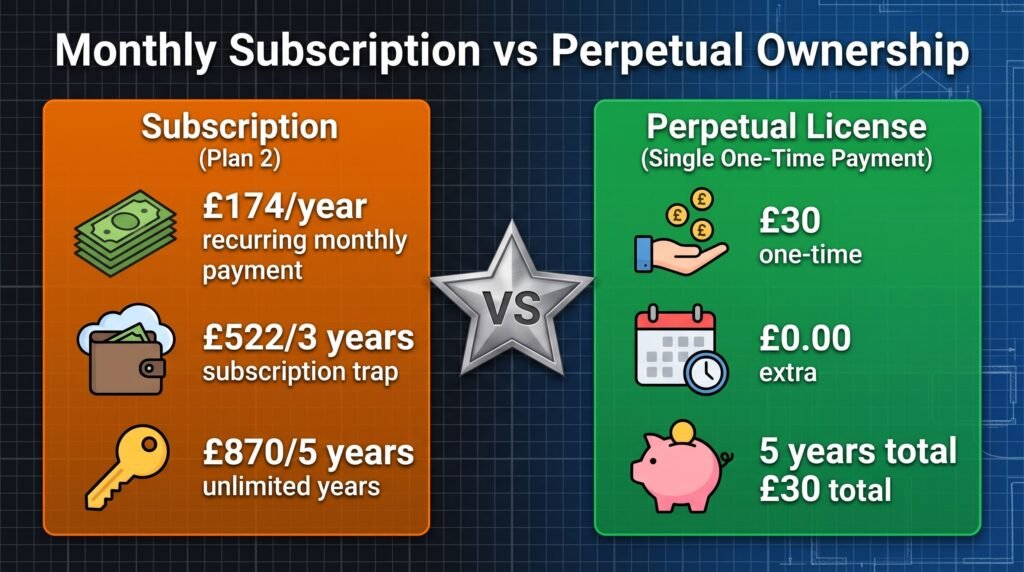
Scenario A: The Cloud Subscription Model (Visio Plan 2)
The full-featured desktop version of Visio delivered via cloud subscription (Visio Plan 2) is priced at approximately £14.50 per user, per month (excluding tax).
- Year 1 Cost: £174.00 per user.
- Year 3 Cost: £522.00 per user.
- Year 5 Cost: £870.00 per user.
- The Catch: In this subscription structure, your organization never owns the software. The moment your subscription lapses, edit access is immediately revoked, leaving you unable to modify your proprietary diagrams.
Scenario B: The Perpetual Desktop Model (Druino Lifetime Key)
Procuring an authentic, standalone desktop license (such as Visio Professional 2024) through an authorized distributor like Druino involves a single upfront investment, typically ranging between £12 and £30 depending on edition and active promotional pricing.
- Year 1 Cost: £30.00 (Single one-time payment).
- Year 3 Cost: £0.00 additional fees.
- Year 5 Cost: £0.00 additional fees.
- The Bottom Line: By deploying a perpetual visio license, an enterprise saves over £840 per seat over a 5-year hardware lifecycle. The organization retains permanent ownership of the software, eliminating the risk of operational disruptions caused by billing disputes. Choosing a standalone visio license prevents thousands of pounds in unnecessary SaaS overhead.
5. Core Architectural Features That Define Microsoft Visio
Deploying an authentic visio license provides access to a calculation engine that streamlines technical documentation across multiple operational disciplines.
5.1 Advanced Network Topology Mapping
For IT operations teams, manually tracking network assets is an inefficient practice. With Visio Professional, administrators can generate detailed rack diagrams, local area network (LAN) maps, and wide area network (WAN) routes. Stencils feature precise, manufacturer-accurate representations of servers, patch panels, switches, and edge security appliances.
5.2 Real-Time Data-Linked Dashboards
One of the most powerful reasons to invest in a professional visio license is its ability to turn static drawings into operational control dashboards. By binding data fields from an Excel sheet or SQL database to specific diagram elements, shapes can dynamically adjust their color, fill pattern, or data callout badges. An IT team can map ping response times to server shapes, highlighting network bottlenecks visually the moment thresholds are breached.
5.3 Software and Database Architecture Schemas
Software developers and database engineers rely on Visio to conceptualize logic flow before writing production code. With comprehensive support for UML 2.5 class diagrams, state machines, and sequence charts, software teams can communicate architectural intent seamlessly. Database architects can map Entity Relationship (ER) diagrams to visualize primary keys, foreign keys, and relational constraints across complex SQL schemas.
5.4 AutoCAD Blueprint Manipulation
Architectural engineers frequently need to overlay specialized infrastructure directly onto building designs. When you deploy a professional visio license, you can import native .dwg and .dxf CAD drawings. Visio preserves layer data, allowing you to hide non-essential elements (like furniture) while locking architectural walls, enabling precision placement of security cameras, fire alarms, and network cabling drops.
5.5 Comprehensive Process Validation
In regulated industries, a procedural diagram must not contain dead-end processes or orphan logic loops. Visio Professional includes automated process validation engines. Running a check against strict BPMN rules flags structural errors immediately, ensuring your operational flowcharts meet rigorous ISO certification criteria.
6. Workstation Hardware and System Requirements
Prior to finalizing your procurement, confirm that your workstation hardware meets the technical standards specified in the official Microsoft 365 and Office System Requirements Documentation. Evaluating your computer hardware before purchasing a visio license ensures seamless vector rendering and calculation stability.
| Component | Minimum Specification | Recommended Specification |
| Operating System | Windows 11 or Windows 10 (64-bit) | Windows 11 (64-bit, latest release) |
| Processor | 1.6 GHz, dual-core CPU | 2.0 GHz+ quad-core modern CPU |
| System Memory (RAM) | 4 GB RAM | 8 GB to 16 GB (for multi-thousand shape layouts) |
| Available Storage | 4.0 GB free disk space | High-speed Solid-State Drive (NVMe SSD) |
| Display Resolution | 1280 x 768 screen resolution | 1920 x 1080 (Full HD) or 4K dual-monitor setup |
| Graphics Hardware | DirectX 9 with WDDM 2.0 driver | DirectX 12 compatible GPU for vector scaling |
(Technical Note: Microsoft Visio is a native Windows desktop suite. A standard visio license does not execute directly on macOS. Apple Mac environments must utilize a virtualization platform such as Parallels Desktop or VMware Fusion hosting an authorized Windows installation).
7. Step-by-Step Installation and Product Activation
Activating enterprise desktop software is straightforward when following official deployment practices. After purchasing your visio license, execute the following steps:

Step 1: Secure Your Visio 2024 Key
Navigate to Druino and select your chosen edition to buy visio with instant digital handling. Immediately after transaction approval, you will receive an automated delivery email containing your genuine 25-character visio product key. Applying an authentic visio 2024 key provides instant access to the latest interface refinements and stencil libraries.
Step 2: Bind the License to Your Microsoft Profile
Avoid unverified download links or peer-to-peer distribution networks:
- Launch your browser and navigate directly to the official Microsoft Setup Portal.
- Log into your corporate or personal Microsoft account.
- Input your 25-character visio product key into the designated entry field.
- Select your geographic region and deployment language.
- Microsoft will validate the key immediately. Once verified, this permanent visio license is digitally attached to your identity, allowing you to reinstall the software if you replace your hardware later.
Step 3: Download and Execute Setup
- From your confirmed account dashboard, select Install under the products section.
- The official Microsoft Click-to-Run deployment stub will download to your local drive.
- Run the installer. The setup engine will stream the core installation assets in the background, completing configuration within minutes.
Step 4: Finalize Activation
- Access your Windows Start Menu and launch Visio.
- Accept the Microsoft Software License Terms.
- Sign in using the Microsoft Account linked in Step 2.
- The system automatically verifies your bound visio license, permanently unlocking the full application without any recurring subscription prompts.
8. Security Risks: Avoiding Gray-Market Keys and KMS Emulators
As procurement managers search for ways to lower software expenses, they may encounter third-party sellers advertising Visio licenses for unrealistic prices (such as £5 to £10). Utilizing these unauthorized channels carries severe cybersecurity, operational, and legal risks.
The Dangers of KMS Activator Scripts
Disreputable vendors rarely supply genuine retail product keys. Instead, they provide download bundles packaged with third-party KMS (Key Management Service) activators or batch scripts. These utilities inject unauthorized DLL files into your operating system to simulate an enterprise license server.
- The Malware Risk: KMS activators regularly contain Trojan downloaders, spyware, and cryptocurrency miners. Installing these scripts to activate a fake visio license compromises your local network and can lead to severe data breaches.
Blacklisted Corporate Volume Keys
Other illicit vendors obtain multi-activation volume keys (MAK keys) intended for specific corporations and sell individual seats to public buyers.
- The Revocation Risk: Microsoft monitors activation telemetry across the globe. When a volume key is activated across thousands of unrelated geographic IP addresses, it is permanently blacklisted. Your software drops into view-only mode without warning, locking you out of editing your project assets.
Genuine Retail Licensing
To maintain total data integrity, protect system security, and remain fully compliant with software licensing regulations, always acquire a genuine retail visio license. Retail keys guarantee individual allocation, full update privileges, and permanent operational stability.
9. Why Buy Your Visio Key from Druino?
Procuring software through a dependable, reputable vendor is just as crucial as choosing the right application tier. Druino has built a trusted reputation as a leading UK digital software provider, serving private contractors, growing businesses, and educational institutions.
The Druino Commitment:
- 100% Verified Microsoft Licenses: Every single visio license distributed by Druino is sourced through authorized supply lines and binds directly to Microsoft’s official setup portal.
- Instant Digital Delivery: Within moments of payment verification, your 25-character activation key, official download guide, and VAT-compliant purchase invoice arrive in your email inbox.
- Lifetime Ownership Guarantee: When you choose to buy visio from Druino, you pay a single, transparent charge. Your license is permanent and free of surprise renewal fees.
- Dedicated UK-Based Technical Support: If you encounter configuration hurdles or activation queries, our technical support desk is readily accessible via phone (
+44 20 8040 4209) and email (support@druino.co.uk).
10. Frequently Asked Questions
Can I install a single license across multiple computers?
No. Standard standalone retail software follows a single-device installation framework. A perpetual visio license authorizes one primary workstation installation. If multiple engineers or analysts within your company require the software, an independent product key must be procured for each seat.
What happens if my primary computer experiences a hardware failure?
Because your genuine retail visio license is attached to your Microsoft account rather than tied to your physical motherboard, your software remains safe. If your PC suffers component failure, simply log into the Microsoft setup dashboard on your replacement computer, deactivate the previous session, and install your software without repurchasing.
Can Visio Standard view files created in Visio Professional?
Yes. Visio Standard easily opens drawing files (.vsdx) generated within Visio Professional. However, advanced capabilities specific to the Professional edition—such as active external database links, BPMN validation rules, and specialized engineering stencils—will remain disabled.
Is Microsoft Visio included in standard Office or Microsoft 365 bundles?
No. Visio is classified as an advanced, specialized engineering tool and is never included in standard packages like Office 2024 Home & Business, Office Professional Plus, or Microsoft 365 Personal/Family tiers. A dedicated visio license must always be acquired separately.
Does the standalone desktop application require an internet connection?
No. Continuous internet access is not required. You only need an internet connection during the initial installation and activation process. Following activation, you can use your visio license completely offline, making it ideal for secure facilities and travel laptops.
Conclusion: Elevate Your Visual Documentation with Permanent Software
In an era of complex system architectures and demanding industry standards, relying on informal sketching tools or limited office applications compromises clarity, professionalism, and project success. Upgrading to an enterprise-grade diagramming solution is essential for modern technical teams.
You do not have to bind your organization to an expensive, never-ending SaaS subscription. By securing an authentic, perpetual visio license, you reclaim complete ownership of your creative tools. You gain access to industry-standard stencils, dynamic data-linking capabilities, and precise vector scaling engines—all for a single, cost-effective upfront payment.
Stop renting your technical software. Gain permanent control over your engineering workflows today.
Explore our full inventory of authentic digital software at the Druino Technical Software Catalog. Secure your visio license today to enjoy instant digital delivery, lifetime activation assurance, and dedicated UK customer care.